
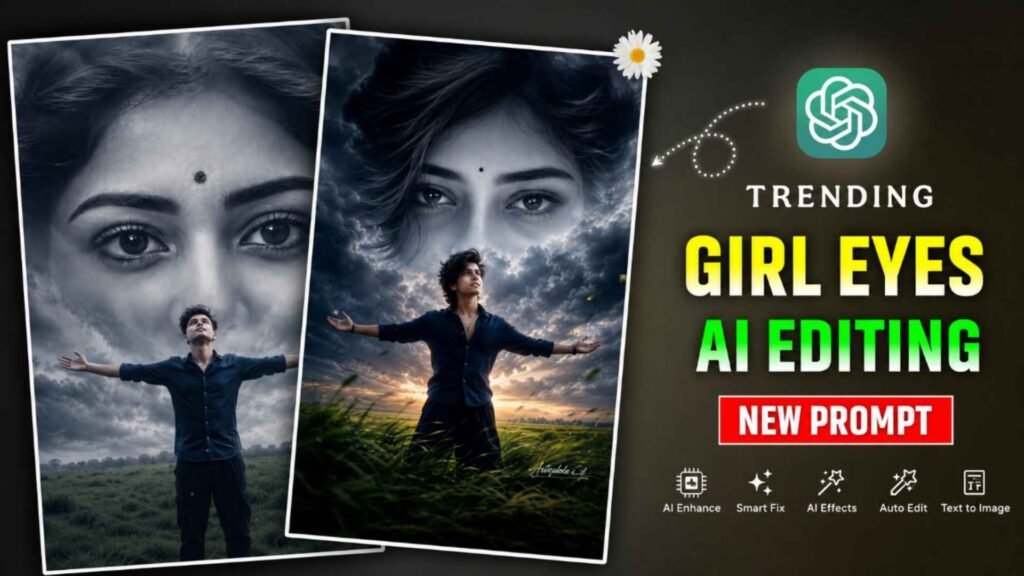
Girl Eyes Ai Photo Prompts – Recently he had some dispute with his girlfriend. Due to which the breakup happened. Or you can say who misses his girlfriend. Today’s article will be very useful for them. Because right now AI Photo Editing Trend is going viral very fast. Which people know as Girl Eyes AI Photo Editing. In this type of pictures, a boy is seen standing in a field, road or open environment. While behind him in the sky a giant girl’s face or only her eyes are visible. This photo looks very emotional and cinematic. Due to which people are sharing it with Sad Songs and Emotional Shayari. The most special thing about this trend is that it does not require any expensive photo editing software to create it. Today, with the help of ChatGPT, Gemini, Grok, Bing Image Creator and other AI Image Generator tools, such a photo can be created in just a few minutes using only a good prompt.
This is the reason why millions of people are changing their photos in this style and posting them on social media. If you also want to get complete information about Girl Eyes AI Photo Editing Trend and want to know how this type of photo is made, which selfie is the best, whether a girl’s photo is needed or not, and which prompt gives the best result. Then this article will prove to be very useful for you.
Complete Information Girl Eyes Ai Photo Editing
Girl Eyes AI Photo Editing mainly creates an emotional and cinematic scene. In this type of picture usually a boy is seen standing alone. His hands are open, his face is towards the sky and an expression of sadness, remembrance or emotional attachment is visible on his face. The main attraction of the photo is the eyes or the entire face of the huge girl visible in the sky. Which emerges from among the clouds. Many people think that to make such a photo, an actual photo of the girl is necessary, but it is not at all necessary. If your aim is only to create photos according to viral trends, you can also get great results using just your selfies and a good AI Prompt. However, if you want the face visible in the sky to be that of a particular girl, like your girlfriend, wife or any other person, then you can upload her photo as a reference image. For best results, use a selfie in which your face is clearly visible, the background is simple, the photo is in high quality and the face is adequately lit.
Prompt Can Be Used In Both Gemini And Chatgpt
Many people have a question in their mind whether Girl Eyes AI Photo Editing Prompt will work only in ChatGPT or also in Gemini. The answer is that if Prompt is well written, it can be used on both platforms. ChatGPT and Gemini are both modern AI models with the ability to generate images based on text. When you upload your selfie in an AI tool and give a detailed prompt along with it. Then AI tries to create a similar scene by reading that prompt. Therefore, the more clear and detailed the prompt is, the better the results will be. An important point to note is that different AI models may produce slightly different results on the same prompt. Therefore, if you do not get the desired results the first time, make some changes in the prompt and try again.
What To Do To Get Perfect Results
If you want your Girl Eyes AI Photo Editing photo to look exactly like the viral photo, just copying the prompt is not enough. It is also important to keep some important things in mind. First of all always use high quality selfie. Your face should be clearly visible in the photo and there should be enough light on the face. If the photo is blurry then AI will not be able to recognize the face correctly. Secondly, give as much detail as possible in the prompt. Instead of just writing “girl eyes in sky,” mention things like sky, clouds, lighting, emotions, camera angles, cinematic atmosphere, and facial expressions. If you follow all these things then your photo will not only look more attractive but will also attract people’s attention on social media faster.
Girl Eyes Ai Photo Prompts


How To Use Girl Eyes Ai Photo Editing Prompts?
The process of creating Girl Eyes AI Photo Editing is very easy. First of all, open any AI tool like ChatGPT, Gemini, if you want, you can also install it from Play Store. Because it also has its own app. Now open the app and if asked to login then definitely login with the help of Gmail ID. Then select Create Image option. Because there are many options there. After selecting the Create Image option, upload your selfie photo with the help of Media option. If you want to make the photo realistic, then upload the girl’s photo also, then paste the copied prompt in the chat box and click on the send button. Ai will start creating your photo eye. Within a few seconds or minutes AI will convert your photo into this style. If you do not get the correct result in one go, then try making the photo two to three times. You will definitely get a good result. Before sharing that photo on social media, especially on Instagram. Make sure to do all this in detail like doing color grading in the photo, making the photo in HD quality, only then share it.
Conclusion
Girl Eyes AI Photo Editing is one of the most popular and viral AI Photo Editing Trends of the present time. The main reason for the popularity of this trend is its emotional appeal and cinematic look. People are sharing these types of pictures along with Sad Songs, Emotional Quotes and Love Status on social media. Due to which this trend is spreading even faster. If you also want to join this trend then Girl Eyes AI Photo Prompts. Will prove to be very good for you. The best part is that creating this type of photo does not require any professional editing skills. With just a good selfie and the right prompt, anyone can. Create such an attractive photo in just a few minutes.

I’ve Been editing photos and videos for over 5 years. Here, I share Lightroom Presets, Ai Photo Editing Prompts, Vn Templates, and easy editing tutorials so you can give your photos and videos a professional look. Welcome to the world of creative, high-quality editing