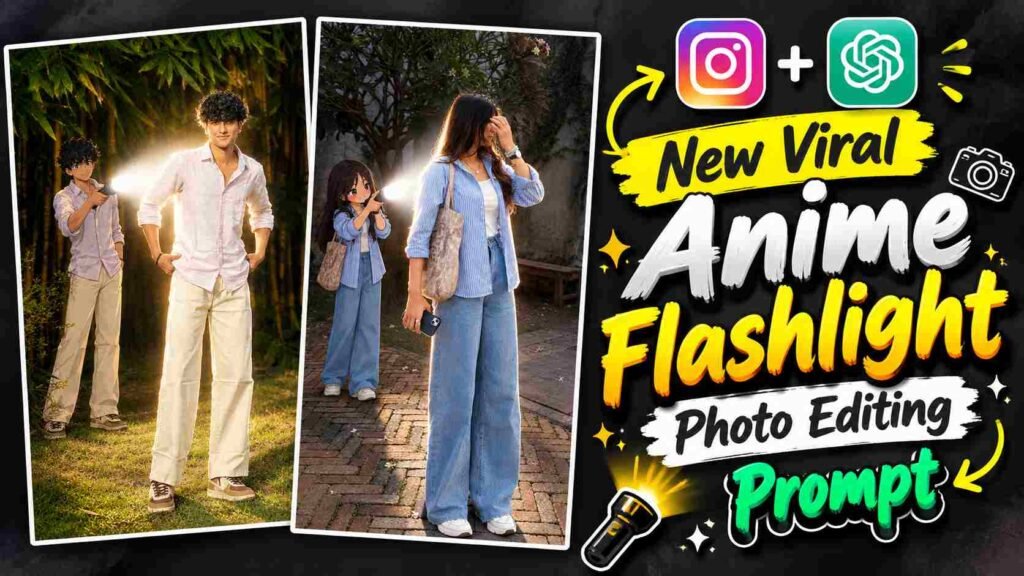
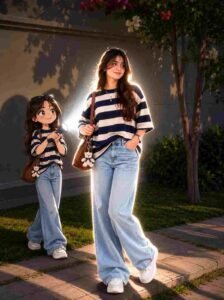
Anime Flashlight Prompt – These days, such creative concepts are being liked a lot in AI Photo Editing, in which the entire scene looks completely new by adding a different visual element to the real photograph. Similarly, Anime Flashlight Photo Editing is also an interesting viral-style concept, in which a small anime version of the same person appears behind your normal real-life photo. The anime character stands with a flashlight in his hand and its bright white light falls on the backside of the real subject in front, creating a cinematic effect of bright glow, rim light and dramatic shadows. The special thing about this edit is that while maintaining the original identity, face, hairstyle, outfit and overall appearance of the main person, his anime version is naturally integrated into the same scene.
We have given different prompts for both boys and girls for this concept, so you can create this viral-style AI image in ChatGPT by choosing the suitable prompt as per your photo. This article will explain this editing concept in detail, including how to choose the right photo, how to use the prompt in ChatGPT, and step-by-step steps to improve the final image.
About New Viral Anime Flashlight Photo Editing
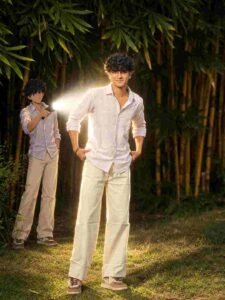
New Viral Anime Flashlight Photo Editing is an AI image concept that combines real and anime versions of the same person in a photograph. The main subject is kept in its original realistic form, while a smaller, full-body anime character of the same person appears behind them. The anime character’s hairstyle, clothing, colors, and overall appearance are matched to the main subject, creating a connected look between the two. The anime character in the background holds a powerful flashlight, whose white beam falls on the back of the real subject, creating bright illumination, a glowing rim light, and natural shadows throughout the scene. The flashlight’s light is made more prominent by keeping the surrounding environment slightly darker, while the original background and photographic realism are maintained. This combination gives the final image the natural look of real photography on one hand and the creative element of an anime character on the other. This basic concept can be used in prompts for boys and girls, based on their different reference photos and appearances.
How to Create an Anime Flashlight Photo in ChatGPT?
To create this AI photo editing, first prepare a clear photo of yourself in which your face, hairstyle, outfit, and body are properly visible. The photo should not be too blurry or heavily filtered, as ChatGPT needs a clear reference image to understand your original appearance. Next, upload your photo to ChatGPT and use the Boy Prompt or Girl Prompt below, depending on your requirements. Use the Boy Prompt if you’re editing a boy’s photo, and choose the Girl Prompt for a girl’s photo. The prompts tell ChatGPT how to preserve the main subject, where to place the anime version behind it, how to match the anime character’s outfit and appearance, and how to create realistic flashlight lighting. After pasting the prompt, create an image using the image generation option and wait for the generation process to complete. ChatGPT will use your uploaded photo as reference and attempt to combine the real subject and anime character in a single cinematic environment. For better results, it’s helpful to have the subject’s body pose and clothing clearly visible in the original photo, as this makes it easier to create the anime character with a matching appearance.
Boy Anime Flashlight Photo Prompt
Girl Anime Flashlight Photo Prompt
How to Maintain a Realistic Look?
To make this edit realistic, it’s crucial to properly preserve the main subject’s face, hairstyle, outfit, and natural appearance. Position the anime character correctly behind the subject, and ensure the flashlight’s white beam, glow, rim light, and shadows naturally match the original background lighting. Proper contact shadows and light interactions on the anime character will make them appear part of the scene, rather than a separate cartoon element. If the original details of the background or subject are good, avoid unnecessary changes.
How to Customize and Correct?
If a minor flaw is noticed after the image is generated, there’s no need to re-edit the entire prompt. Make small, clear corrections to the problem area, such as adjusting the anime character’s position, flashlight brightness, or lighting. Avoid altering the face, hairstyle, and outfit to maintain the original identity and overall composition. Making one or two specific corrections at a time can easily refine the result.
Conclusion
This Anime Flashlight Photo Editing combines a real photo and an anime character into a single cinematic scene, giving a normal picture a unique AI look. Both boys and girls can create this edit using the prompts provided with their photos. Generate the image with a clear reference photo and the correct prompt, and make small corrections if needed to enhance the final result.

I’ve Been editing photos and videos for over 5 years. Here, I share Lightroom Presets, Ai Photo Editing Prompts, Vn Templates, and easy editing tutorials so you can give your photos and videos a professional look. Welcome to the world of creative, high-quality editing