
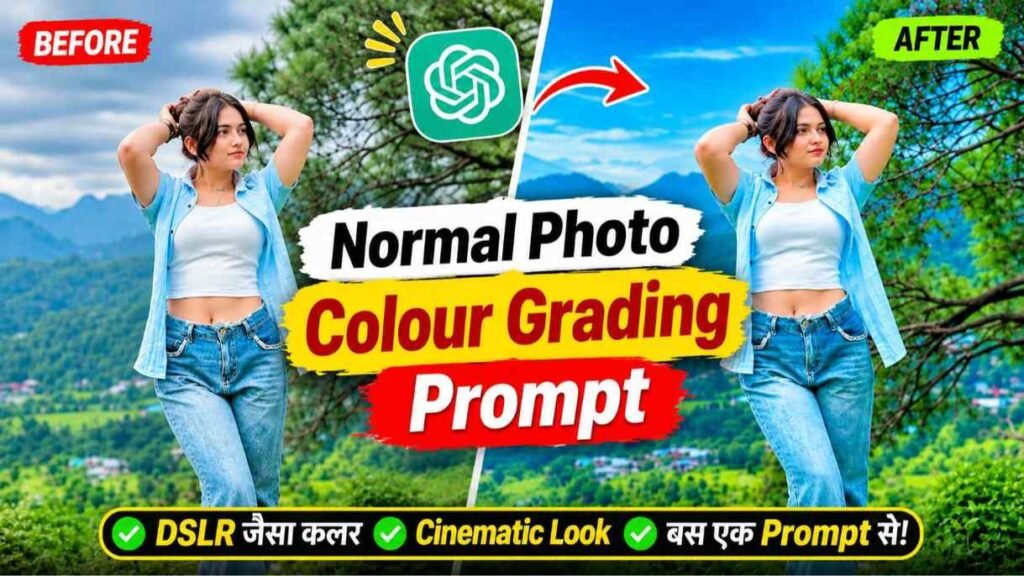
Color Grading Prompt – Nowadays, a new trend of color-correcting photos with the help of artificial intelligence is becoming increasingly popular on social media. You must have also seen such pictures on Instagram or other social media, in which a picture taken with an ordinary mobile is given a look like a picture taken with an expensive DSLR camera in a few moments. Earlier people used to use applications like Lightroom to make their photos attractive. It required a lot of manual work to correct colors, enhance lighting, balance shadows, and beautify backgrounds. But now artificial intelligence has made this entire process quite simple. You can give your photo a new cinematic look with just a simple trick and the right instructions. This is why many people these days are color-correcting their photos using artificial intelligence-based tools like ChatGPT. The best part is that you don’t need to be a color-correcting expert or use any expensive applications. In this article, we are going to give you one such useful instruction, with the help of which you can convert your ordinary photo into an attractive photo like a DSLR.
Normal Photo To DSLR Look Color Grading
When we want to make an ordinary photo look like one taken with a DSLR camera, just increasing its brightness or colors is not enough. For this it is necessary to pay attention to different parts of the picture. Artificial intelligence makes this work very simple. It first balances the levels of light and dark in the photo, making faces and surrounding objects appear clearer. After this, the colors of sky, mountains, trees, plants and background can be made natural and attractive. For example, adding light blue or dark blue to the sky, natural greenery in the mountains, and cool shades to the shadow areas can give a cinematic look to the photo. Apart from this, it is also necessary to preserve the actual color of the skin, original color and natural texture of the clothes present in the photo. Artificial intelligence can improve the spread of light, background blur, depth of shadows, and color balance. This gives a beautiful depth to the photo and makes it look more attractive.
However, it should be noted that color correction alone does not fully achieve the results obtained from actual camera optics and lenses, but with the right instructions a simple photo can be given a look much like professional photography.
How To Fix The Face Change Issue?
While color-correcting photos with the help of artificial intelligence, the biggest problem people face is the alteration of faces. You must have also seen many times that when we give a simple photo to ChatGPT and ask it to improve it, then the face of the person in the finished photo does not remain the same as before. There is a slight change in the structure of the eyes, nose, lips and face. The main reason for this is that artificial intelligence often recreates parts of the photo instead of simply improving it. To avoid this problem, you should keep some important things in mind while writing instructions. First of all, use your original photo as a base. After this, write clearly in the instructions that there should not be any change in the person’s identity, facial structure, eyes, nose, lips, hair style, facial expressions and natural texture of the skin. Also note that only color correction, lighting, shadow and background quality improvements should be made. The person’s physical appearance, clothes and position in the photograph should also remain exactly the same as before.
Color Grading Prompt
MAKE YOUR PHOTO
Make Normal Photo To DSLR Look Using Prompt
Now the most important thing comes that how to give your ordinary photo a DSLR like look with the help of artificial intelligence. You don’t need any special color-correcting applications or complicated procedures for this. First of all, open ChatGPT in your mobile and upload the simple photo which you want to color-correct. After this write the instructions given below and send it. This instruction covers all the essentials like maintaining facial symmetry, natural skin, attractive sky, greenery of mountains, balancing light and shadow. To get better results, keep the original quality of your photo good and do not change the words given in the instructions unnecessarily. In particular, note that artificial intelligence is said to color-correct an original photo rather than create a new one. This will help preserve the true identity and original appearance of your photo.
Conclusion
Now you too can give your ordinary photos an attractive and professional look with the help Color Grading Prompt of this instruction. The best part is that it doesn’t require any complex knowledge of color correction. With the right instructions and a good base photo, you can achieve beautiful colors, balanced lighting, and cinematic effects in your photos. However, for better results always use your original photo and check the facial similarity in the finished photo.

I’ve Been editing photos and videos for over 5 years. Here, I share Lightroom Presets, Ai Photo Editing Prompts, Vn Templates, and easy editing tutorials so you can give your photos and videos a professional look. Welcome to the world of creative, high-quality editing

Pingback: 2026 To 2027 Trending Reels Editing Capcut Template