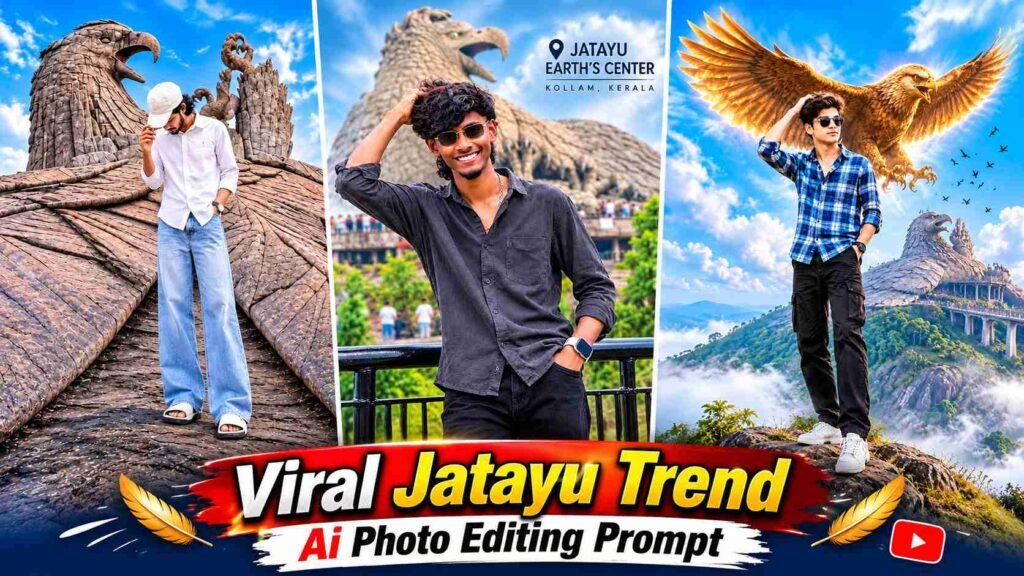
Jatayu Ai Photo Prompt – These days, a trend of AI photo editing is gaining popularity on social media, transforming an ordinary photo into a stunning cinematic travel poster or a professional photo taken at a beautiful tourist destination. Jatayu Trend AI Photo Editing is a similar fascinating concept. It allows you to present your own photo alongside the giant stone bird statue at Kerala’s famous Jatayu Earth’s Center in a unique and spectacular way. Such photos feature visual elements like high mountains, lush landscapes, clouds in the sky, a massive Jatayu sculpture, and cinematic lighting. With ChatGPT AI, you can transform your ordinary photo into a stunning AI travel photo with all these elements. You don’t need any complex photo editing software; instead, you can create your own Jatayu Style AI photo using a clear reference photo and one of the four different editing prompts below.
About Jatayu Trend AI Photo Editing
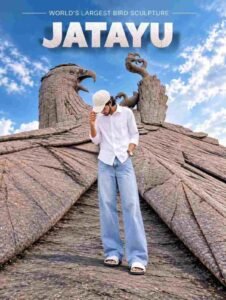
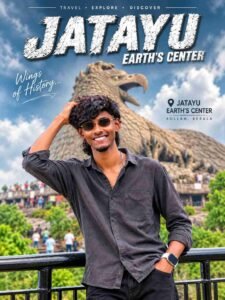
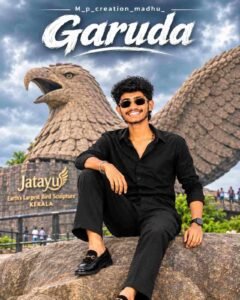
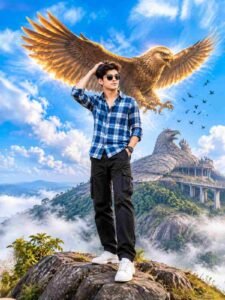
Jatayu Trend AI Photo Editing is an AI photo editing concept that combines your reference photo with the Jatayu Sculpture and its surrounding natural environment into a new cinematic composition. The unique feature of this trend is that instead of simply changing the background, the entire photo is transformed into a travel photography or professional poster. For example, one photo might show you standing on a mountain cliff, with a large golden eagle spreading its wings behind you, surrounded by green hills, clouds, and flying birds. Another design might show you sitting on a large rock, with a massive stone sculpture of Garuda or Jatayu visible in the background. Other styles might include large artistic text like JATAYU and GARUDA, travel typography, and location details of Kerala. Using different prompts, a single reference photo can be used to create a variety of creative looks. For best results, your face should be clearly visible in the reference photo so ChatGPT can recognize and retain your facial features, hairstyle, and overall appearance. However, AI isn’t guaranteed to produce exactly the same results every time, so you can make small improvements to the generated image if needed.
4 Best Jatayu Trend AI Photo Editing Prompts
Below are four different prompts for Jatayu Trend AI Photo Editing. Each of these prompts has a different concept, so you can use any one of your choice to transform your reference photo into a new cinematic Jatayu style. One prompt will feature a mountainous landscape and a giant eagle, while another will feature a professional travel poster-like design with a Jatayu sculpture. To use these four prompts in ChatGPT, upload your reference photo and then paste the selected prompt.
All Jatayu AI Photo Editing Prompt Here
How to Create a Jatayu Trend AI Photo Using ChatGPT?
Creating a Jatayu Trend AI Photo using ChatGPT is quite easy. To do this, first open ChatGPT on your mobile or computer and use the image generation feature if available. Now, select the reference photo from your gallery that you want to edit in Jatayu Style. Try to ensure that your face is clearly visible in the photo and that it doesn’t have too much blur or heavy filter applied. After uploading your reference photo, copy one of the four prompts above and paste it into ChatGPT’s message box. Following the instructions in the prompt, ChatGPT will attempt to transform your reference photo into a new AI image with the Jatayu sculpture, mountain environment, sky, lighting, and other cinematic elements. Then, carefully examine the generated image. If your face, hairstyle, clothing, pose, or background don’t look as you expected, you can give ChatGPT a small correction instruction based on the generated image. For example, you can ask it to keep the facial recognition closer to the reference photo, make the pose more natural, or make the Jatayu sculpture more visible in the background. For best results, only make one or two important changes at a time so the AI doesn’t unnecessarily alter the entire composition. Once you like the final image, save it and share it on Instagram, Facebook, or other social media platforms.
Final Thoughts
Jatayu Trend AI Photo Editing is a great creative idea for those who want to give their ordinary photos a unique cinematic and travel photography look. With ChatGPT, you can transform your reference photo into a new look with a giant Jatayu sculpture, beautiful hills, clouds, and professional poster designs. The four prompts in this article have different concepts, so you can choose any prompt to create your own AI photo. For best results, always use a clear reference photo and, if necessary, refine the image to your liking by adding small correction instructions. If you enjoy this type of AI photo editing, be sure to share your Jatayu AI photo on social media and keep visiting Razz Suman for more such new AI photo editing ideas.

I’ve Been editing photos and videos for over 5 years. Here, I share Lightroom Presets, Ai Photo Editing Prompts, Vn Templates, and easy editing tutorials so you can give your photos and videos a professional look. Welcome to the world of creative, high-quality editing