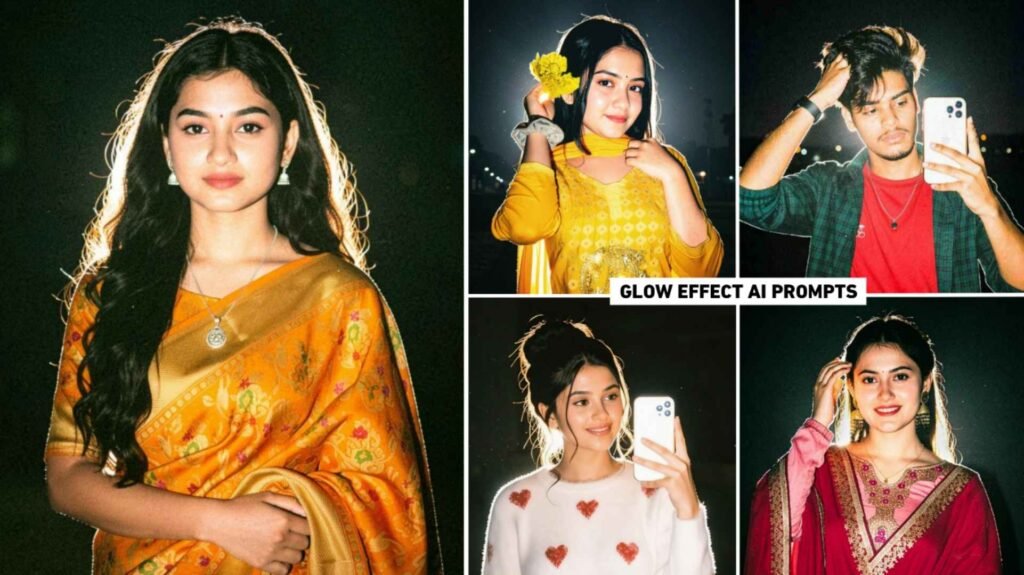
Lofi Dusk Filter Prompt – Friends, do you remember that a few weeks ago there was a trend in which everyone, be it a boy or a girl, edited any kind of photo with flashlight and shared it on Instagram, which went viral very fast. The only reason for that photo going viral was that people were making that type of photo using Instagram only. Because a new type of filter was added to Instagram just a few days ago. Which was being used to make the same photo. Do you know that currently another trend similar to this is being seen on Instagram. In which everyone is making a similar photo and sharing it. Which is currently being known as Glowing Effect Photo Editing. Which is being created using Instagram filters only. Our article today is related to glowing effect photo editing. Because I have seen many people making such photos using Instagram. But when photos are made three to four times. So the problem of Something Went Wrong is seen there. That is to say, we can make photos only two to three times a day.
Then we have to make photos the next day. That is why in this article we are going to tell you how to create that kind of photo with chatgpt. For which I will share some prompts in this article.
Detail Of Glow Effect Ai Photo Editing
With the help of Instagram’s Lofi Dusk Filter or the AI prompt shared by me in this article, you can create any kind of photo with glowing effect. So we will see in that photo. The entire photo has a dramatic look at night. If you look carefully at your photo, you will see a glow of white light at the edges of your hair and clothes. People also commonly call this ring light or backlighting. This light often separates the subject from the dark background, giving the photo depth and a 3D effect. Talking about color grading, the color of the cloth is greatly enhanced. So that it pops perfectly in the dark background. There is a slight glow on the clothes and face in your photo. If you zoom in on the photo carefully, you will see some grain (light noise) and particles in it. In the background, some dust particles flying in the air, called dust particles, will also be faintly visible. Due to which your photo looks absolutely realistic. We will share at least two to three types of prompts to create a photo with AI.
Create Lofi Dusk Photos Using Instagram Filter
To create such a photo with the help of Instagram, first of all try to update Instagram from Play Store. If you do not update, the filter will not be visible there. That’s why please update. After updating, open the Instagram app and click on your profile. From where you post the photo story. So select the story option there and add one of your photos from the gallery. Now an option of Restyle will be visible on the adjacent side. So click on it and click on all filter option. Select the Backgrounds category and apply the Lofi Dusk filter and wait for a while. Your photo will be ready with exactly the same glowing effect. To save the photo, click on the Save button and click on the download icon to save the photo. If you create a photo from Instagram and face the problem of somiting went wrong, then you can create the exact same photo with the help of chatgpt with the help of prompt. We know about this in the next paragraph.
Lofi Dusk Filter Prompt

Create A Photo With Lofi Dusk From Chatgpt Prompt
Look, you can easily create such a photo by using the Lofi Dusk Filter Prompt that I have shared in Chatgpt. The biggest role in this will be that of the prompt because the better the prompt you use, the better the photo will be. That is why apart from one prompt, we have shared two to three types of prompts. If you are making a photo and you are not able to make a good photo with a prompt. So there you can also try using another prompt. I tell you step by step. How to create photo from chatgpt from given prompt.
- Install the Chatgpt app from the Play Store.
- Open the app and log in with your Gmail account.
- Now select the Create Image option.
- Click on the media option and add your photo from the gallery.
- Enter the copied prompt in the chat box and send it.
- Wait for some time, about one to two minutes.
- Your photo will be ready, then click on the photo.
- Take a good look at your photo and click on the Download button to save it.
- Can you make the rest of the photos in the same way.
CRICKET STADIUM AI VIDEO PROMPT
Conclusion
Like a few days ago a photo with flash light was trending on social media. Similarly, at present glowing photo editing of Lofi Dusk is becoming quite viral which people are making using Instagram only. In this article, we have given complete information about creating such a photo using Instagram. Also, if you want to create photos with the help of AI tool. Like chatgpt gemini, I have also shared Lofi Dusk Filter Prompt in it. With the help of which you can create Lofi Dusk photos like Instagram. So, let us know how you liked today’s guide in the comments section. If you’ve created a photo, be sure to share this article with your friends so they can create similar photos too.

I’ve Been editing photos and videos for over 5 years. Here, I share Lightroom Presets, Ai Photo Editing Prompts, Vn Templates, and easy editing tutorials so you can give your photos and videos a professional look. Welcome to the world of creative, high-quality editing