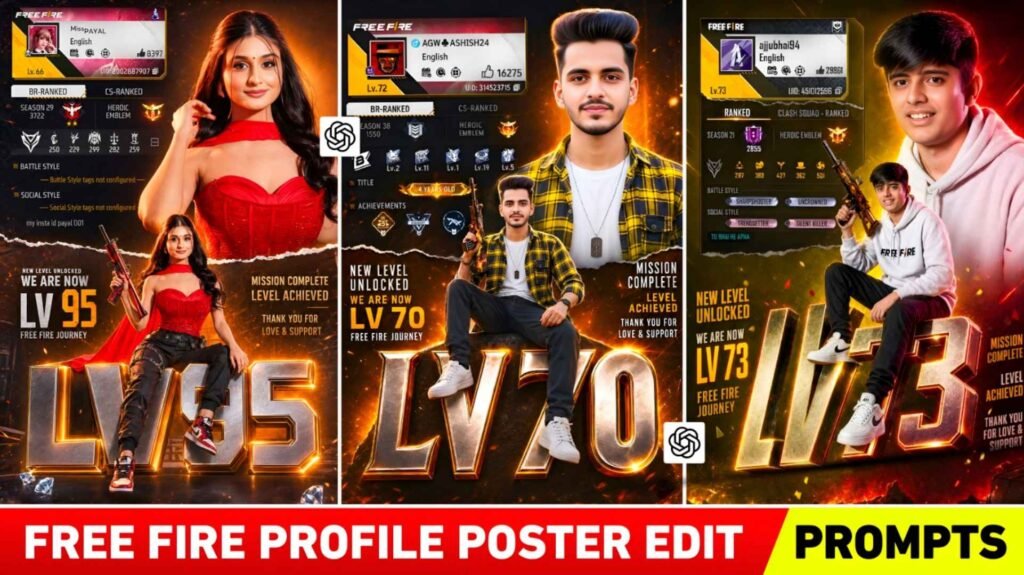
Free Fire Profile Poster Prompt – If you are active on social media. So you must have seen the Instagram Profile Milestone Poster Trend that went viral some time ago. In this trend, people were making a great poster using their Instagram profiles and selfie photos. In which a premium poster was created with followers, profile screenshot and large stylish text. This trend became so viral that everyone started editing their photos in the same style and sharing them on Instagram and Facebook. People liked it because even a simple photo could be transformed into a cinematic and premium look. Now a new and wonderful concept similar to the same trend has emerged, which can be called Free Fire Profile Poster Ai Editing Trend. In this editing, such a poster is created with the help of your Free Fire Profile, your Selfie Photo and an excellent AI Prompt. Which looks exactly like the poster of a pro gamer. This poster includes your game profile, level, rank, and a large 3D level text. In today’s article, I am going to give you the same wonderful Free Fire Profile Poster AI Prompt.
Complete Guide Free Fire Profile Poster Ai Editing
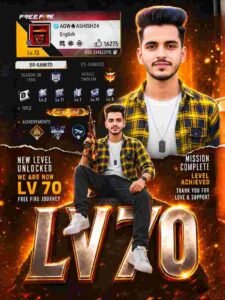
If you look carefully at the Free Fire Profile Poster photo shown above. So many luxurious and premium design elements are present in it. Your Free Fire Profile Screenshot appears at the top, which contains your profile photo, username, UID, Level, Rank Badge and other information about the game. With this, your selfie photo is designed in a premium gaming style. Due to which the photo looks exactly like a gamer poster. A big and bright 3D level text is placed in the middle of the poster, such as LV 73, which is the highlight of the whole photo. You don’t need to put in much effort to make this kind of photo. You must have only two photos. First is your Free Fire Profile Screenshot, and second is a good selfie photo of yours. After this you will have to upload both these photos in ChatGPT and paste the prompt given along with them. In just a few seconds ChatGPT will turn your photo into a stunning Premium Free Fire Achievement Poster. This is the reason why nowadays people are very fond of this type of photo editing.
Why Is This Free Fire Ai Poster Going So Viral?
In today’s time, everyone wants to show something different and unique on social media. Earlier people used to post only simple photos. But now with the help of AI, the method of photo editing has completely changed. That’s why Free Fire Profile Poster AI Editing is going viral. Because. A great combination of gaming and personal photos is seen in this. If there is a Free Fire Player. So for him, getting his game profile featured in a premium poster seems no less than an achievement. The most special thing about this type of poster is that it makes even your ordinary selfie look like a professional gamer poster. Gaming lighting in the background, fire-like glow effect, shiny text and cinematic design make the photo very attractive. This is the reason why people are using such photos as Instagram reels, status and profile posts. If you also play Free Fire, then this trend can be perfect for you because it will make your profile look even more stylish.
Ai Photo Editing Prompts
How To Use Free Fire Profile Poster Ai Editing Prompts?
If you also want to make such a wonderful Free Fire Profile Poster photo, then the method is very easy. First of all you have to take your Free Fire Profile Screenshot, in which your profile details are clearly visible. After this choose a good and clear selfie photo of yours. Try that the quality of the photo is good. So that the result looks even more premium. Now open ChatGPT in your mobile and upload both the photos. After this, copy the Free Fire Profile Poster AI Prompt given in paragraph four and paste it in ChatGPT. After entering the prompt, ChatGPT will analyze your photo and profile and create a great poster in some time. If the result seems a little different the first time, you can try again by making slight changes in the prompt. With the right prompt and good photos, the result is much better. You can also use this photo in Instagram Post, Reel Thumbnail, WhatsApp Status or Gaming Profile.
Conclusion
So we hope that now you have understood what Free Fire Profile Poster AI Photo Editing is and how it can be made. Nowadays, with the help of AI, photo editing has become easier and better than ever. Earlier, to create such photos, Photoshop or a professional editor was required. Now with the help of just a good prompt and two photos, great results can be created in a few minutes. If you also play Free Fire and want to give a different and premium look to your profile, then definitely try this trend. Use the prompt given with your Free Fire profile screenshot and selfie photo. I hope you will like this AI Editing Prompt. If you like this method, then share it with your friends so that they can also create a great poster for their profile

I’ve Been editing photos and videos for over 5 years. Here, I share Lightroom Presets, Ai Photo Editing Prompts, Vn Templates, and easy editing tutorials so you can give your photos and videos a professional look. Welcome to the world of creative, high-quality editing