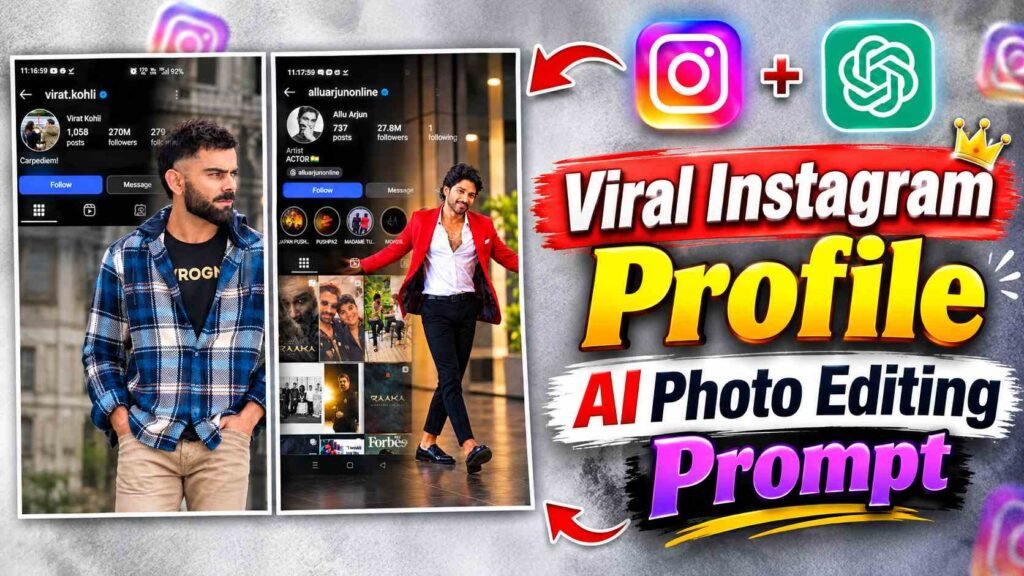
Instagram Profile AI Photo Prompt – New photo editing trends go viral on Instagram from time to time, but one AI photo editing concept is gaining attention these days, showcasing your Instagram profile as a stunning, premium presentation. This edit showcases your entire Instagram profile interface on one side of the photo, including your username, profile logo, number of followers and following, bio, and other profile details. On the other side, your favorite photo is displayed in a large and attractive way. This entire design is backed by a dark cinematic black and charcoal background, creating a natural black shadow gradient from the Instagram interface to your photo. This makes the two parts appear to be part of a single, professional design rather than being superimposed. The best part is that you don’t need sophisticated photo editing software to create such a photo. You can create such a design with the help of AI by uploading a screenshot of your Instagram profile and your favorite photo to ChatGPT. In this article, we’ll explain the entire process of this viral Instagram Profile AI Photo Editing trend in simple terms.
What is Viral Instagram Profile AI Photo Editing?
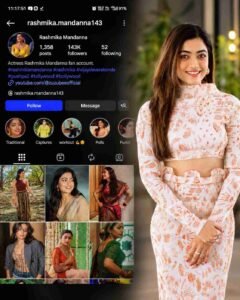
Viral Instagram Profile AI Photo Editing is a creative AI photo editing trend that combines your original Instagram profile and your original photo to create a premium profile presentation. Your Instagram profile isn’t simply displayed as a simple screenshot, but rather placed in a clean and attractive presentation layout. The Instagram interface is displayed on the left side of the design, with attention paid to maintaining your profile information and essential buttons in accordance with the original Instagram layout. Your favorite photo is placed on the right side, ensuring your face, clothing, hairstyle, pose, and overall identity remain intact. It’s backed by a premium dark cinematic background and a slightly blurred architectural effect. The most striking feature is the black shadow gradient between the two, which gradually fades from the Instagram interface towards your photo. This creates a seamless blending between the photo and the profile interface, making the overall design look like a professional 4K Instagram profile poster.
How to Create an Instagram Profile AI Photo Using ChatGPT
To create a viral Instagram Profile AI Photo like this, first open your Instagram account and take a clear screenshot of your profile. When taking a screenshot, ensure that your username, profile picture, number of followers and following, bio, and important buttons are clearly visible. Next, select an original photo from your gallery that clearly shows your face and overall look. Open ChatGPT and upload a screenshot of your Instagram profile and your favorite photo. Then, copy and paste the Instagram Profile AI Photo Editing Prompt below into ChatGPT. Before sending the prompt, make sure that the profile interface and personal details shown in the Instagram screenshot remain unchanged, and that your original photo is used on the right side of the design. After submitting the prompt, ChatGPT will create a Premium Instagram Profile Presentation based on your reference images. For better results, upload both Profile Screenshot and Personal Photo in clear and good quality, so that AI can understand your profile information and photo correctly.
Instagram Profile AI Photo Editing Prompt
The prompt plays a crucial role in creating this design, as it tells the AI which side to position the Instagram interface, where to display your original photo, and what background and lighting effects to use between the two. After uploading reference images to ChatGPT, paste your Instagram Profile AI Photo Editing Prompt in the space provided below. Following the prompt’s instructions, the Instagram UI layout, username, logo, status, bio, and buttons will be correct, with your photo displayed on the right side. Visual details like a dark cinematic background, natural black shadow gradient, and seamless blending will also be taken into account.
Instagram Profile AI Photo Editing Prompt Here.
How to Customize and Correct a Generated Instagram Profile Photo?
The AI-generated photo may be very close to your expectations at first, but sometimes minor errors may appear. For example, the Instagram profile’s username, number of followers, bio, or other text may change. Sometimes, the layout of the profile interface may also appear slightly different from the original screenshot. Similarly, the face, clothing, hairstyle, or body position in your original photo may also change. If this happens, you don’t need to rewrite the entire prompt. You can give ChatGPT a short and clear correction instruction based on the same generated image. For example, you can ask to keep the profile details exactly the same as the reference screenshot, preserve the original face and identity, or use the right-side photo unchanged. If the background appears too dark or the blending between the two areas is not correct, you can instruct to keep the shadow gradient natural and soft. For better results, make only one or two necessary corrections at a time so that the AI doesn’t unnecessarily change the entire design.
Wrapping Up
The viral Instagram Profile AI Photo Editing trend is a great option for those who want to present their Instagram profile in a unique and professional way. The most important feature of this edit is that it displays your original profile details and your original photo in a single cinematic presentation. All you need is a clear screenshot of your Instagram profile, your favorite photo, and the right AI prompt. With ChatGPT, you can easily create this concept and, if needed, make small corrections to enhance the final look. If you’d like to try this new viral AI photo editing trend on Instagram, follow the steps above and create your own premium Instagram profile presentations.
I’ve Been editing photos and videos for over 5 years. Here, I share Lightroom Presets, Ai Photo Editing Prompts, Vn Templates, and easy editing tutorials so you can give your photos and videos a professional look. Welcome to the world of creative, high-quality editing