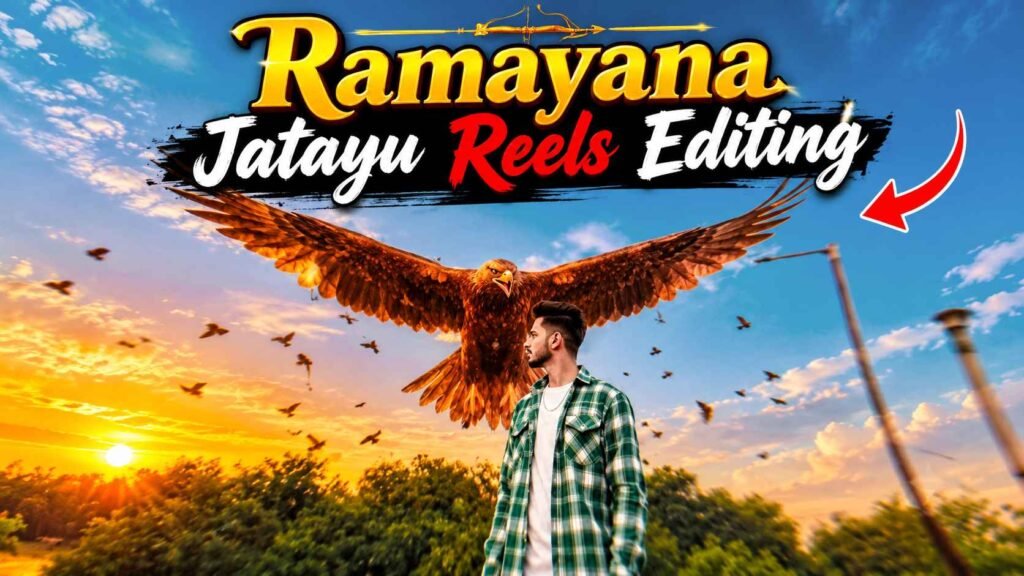
Jatayu Reels Editing – Nowadays, a special type of video related to Ramayana is becoming very popular on social media. This video shows that emotional and wonderful scene of Jatayu, in which a giant bird is seen coming behind the person and spreading its wings. The special thing is that in this scene people are using their faces and their photographs to make themselves a part of the same scene of Ramayana. Such creative videos on Instagram are getting a lot of love from the audience and many people are sharing them as their reels. If you also want to make such a wonderful Jatayu video, then this article is going to be very useful for you. Whereas earlier a lot of hard work was required to make this type of video, now with the help of artificial intelligence it has become quite easy to make it. For this you neither need an expensive editing application nor any special editing skills. You can create this type of video using Google Flow AI or Gemini’s video creation option with the help of a good photo of yourself, a reference video and a specific instruction. In this article.
Detail Of Ramayan Jatayu Reels Editing
The most attractive part of the Jatayu wali viral video that you might have seen on social media is a person and the giant Jatayu bird seen behind him. At the beginning of the video, a person is seen standing alone in an open environment. Behind him, one can see the vast natural scene, the open sky and the surrounding environment. Initially the person stands in a normal position and slowly turns his head and starts looking backwards. After this, a giant Jatayu bird is seen in the video, which comes behind the person and spreads both its big wings. The structure of the bird’s wings, its body shape and its flying style make this scene quite impressive. Small birds flying around and light particles visible in the atmosphere make this scene even more beautiful. The best part is that in this video, while maintaining the real identity and face of the person, the entire scene around him turns into an imaginary cinematic environment. That’s why people are loving creating these types of visuals with their photos. The video looks quite impressive even in its short format of around ten seconds.
Manually Ramayan Jatayu Reels Editing
If we talk about the old way of making this type of video, then many people have to record their own video first to make it. Then they add different Jatayu bird photos, PNG images and other visual effects with the help of a video editing application. Then the video of the person and the pictures of Jatayu are combined in such a way that it appears as if a giant bird is actually coming behind him and spreading its wings. In this entire process one has to do many things like adding the right scene at the right time, adjusting the size of the images and coordinating the lighting and colors in the video. Although this method can still produce good videos, it may take a lot of time and editing experience. Therefore, in this article we are going to tell you an easy method. With the help of which you can make similar videos without doing much hard work. In this. You will not need to record the entire video. On your behalf or find individual PNG images of Jatayu.
All you need is a good photo of yourself and a pre-made reference video featuring Jatayu. After this, with the help of a special instruction, artificial intelligence will help in creating such a scene for you.
Refrance Video & Prompt
REFRANCE VIDEO
VIDEO CREATE
Create Jatayu Reels Editing Using Refrance Video & Prompt
Now let’s talk about the entire process of making this video. For this we can use the video creation option of Google Flow AI or Gemini. First of all, you have to save that reference video of Jatayu in your mobile. Whose scene you want to create in your video. After this choose a good and clear photo of yourself. Keep in mind that your face should be clearly visible in the photo. So that artificial intelligence can better retain your identity.
- First of all, open the official website of Google Flow in your mobile or computer.
- Sign in with your Google account and start a new project.
- Select the video creation option and choose the model as per your requirement among the available models.
- Now upload the reference video and your photo from the available reference or add content options.
- Then enter your previously prepared master instruction in the instructions space. This should clearly aim to create a scene similar to the reference video. While maintaining the face and identity of the person appearing in your photo.
- Choose the video format, length and other available options as per your requirement.
- Now click on the video making option and wait for some time. After your video is ready, you can watch and save it.
Final Thoughts
So friends, in this way you can also create a wonderful video like the popular Jatayu scene of Ramayana with the help of your photo. You don’t need any special editing skills for this. Just with the help of a good photo, reference video and a right master instruction you can create this kind of attractive visualization through artificial intelligence. There is no need to be disappointed if you do not get the desired results the first time. You can try again by changing your photo or making slight changes to the instructions. Sometimes the video may have to be made more than once to get better results.

I’ve Been editing photos and videos for over 5 years. Here, I share Lightroom Presets, Ai Photo Editing Prompts, Vn Templates, and easy editing tutorials so you can give your photos and videos a professional look. Welcome to the world of creative, high-quality editing