
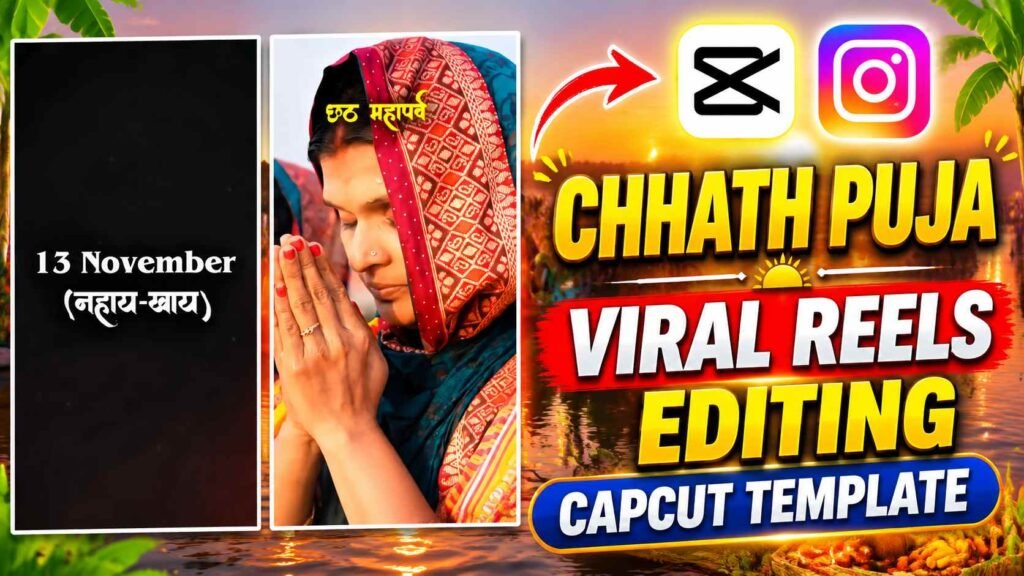
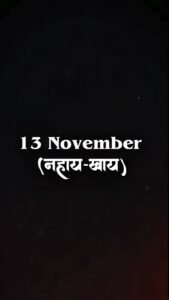
Chhath Puja Capcut Template – If you’re looking to create a beautiful and engaging video for your Instagram Reels on the special occasion of Chhath Puja, this Chhath Puja Viral Reels Editing CapCut Template could be a good choice. The video begins with a dark black background, with faint orange and red flashing lights. The dates of the different days associated with Chhath Puja appear on the screen one by one, accompanied by text animation. The video mentions Nahai-Khai on November 13th, Kharna on November 14th, Sandhya Arghya on November 15th, and Usha Arghya on November 16th. Following the dates, the scene changes, and beautiful clips depicting the actual atmosphere of Chhath Puja begin to appear. At some places, a large number of devotees are seen performing puja on the riverbank, while at other places, women are seen praying to Chhathi Maiya with folded hands. It also includes close-up shots of hands offering prayers in water, puja materials decorated for the puja, thekua placed on a banana leaf, and dishes being fried in water. A yellow text overlay “Chhath Mahaparva” appears over all these clips, giving the video a distinctive festive feel.
Combining various puja scenes, close-up shots, and wide views of the ghats, this template captures the full spirit of Chhath Puja in a short and engaging Reel.
The Specialty of the Chhath Puja Viral Reels Template
The most striking feature of this CapCut template is its date-based opening animation and the subsequent various Chhath Puja scenes. The opening text animation, displaying the dates against a black background, gives the video a distinct feel, while the soft, glowing lights in the background lend it a festive atmosphere. The template then includes various scenes related to Chhath Puja, such as a crowd of devotees on the riverbank, women performing puja, hands offering prayers to the Sun, a puja site decorated with diyas, and scenes of traditional prasad being prepared. Some clips in the video are shown from close-up angles, clearly visible in the puja materials and hand movements. Other scenes show a large portion of the river and the crowd of devotees gathered at the ghat, creating a pleasant visual variation in the video. The yellow text overlay of “Chhath Mahaparva” above each scene maintains a consistent festive spirit throughout the reel.
Furthermore, the transitions between clips and the warm lighting in the background give the video a beautiful and emotional presentation. If you want to showcase the festival’s traditions, puja preparations, and the beautiful atmosphere of the ghat in your Chhath Puja Reels, you can use this template.
Chhath Puja CapCut Template Link
If you’d like to create similar Chhath Puja Viral Reels on your mobile device, you can open the template directly using the CapCut Template Link below. This template already includes the video sequence, opening animation with dates, puja-related clips, “Chhath Mahaparva” text overlay, and transitions. You won’t need to edit these elements individually. Simply click the template link and preview the template once it opens in CapCut. Then, tap Use Template or a similar option to proceed. Paste your CapCut Template Link below:
Chhath Puja Capcut Template
CHECK TEMPLATE

TEMPLATE
How To Use The Chhath Puja CapCut Template?
Using this Chhath Puja CapCut Template is quite easy. First, click the template link above, which will open the template in the CapCut app. If you have CapCut installed on your mobile phone, you can view a preview of the template directly in the app. Then, tap Use Template, and CapCut will open the gallery. Select as many video clips or photos from your mobile gallery as the template prompts. Choose clips that match the theme of Chhath Puja, such as river views, puja preparations, diyas, moments related to prasad or arghya. After selecting all the necessary clips, tap Next. CapCut will then begin editing your selected media using the template’s pre-set sequence, text animations, overlays, and transitions.
Once the video is ready, be sure to preview it to verify that all clips are displayed correctly and that no important parts are missing. If everything is correct, tap the Export option and save your video. This way, you can create your Chhath Puja Reel in a few easy steps without having to do all the editing from scratch.
How to Make Chhath Puja Reels More Attractive?
If you want to make your Chhath Puja Reel even more beautiful, carefully select the clips you use in the template. Try to ensure that the video clips you select show clear and well-defined scenes related to Chhath Puja. For example, scenes of puja preparations on the river bank, fruits and prasad placed in bamboo baskets, burning lamps, hands offering arghya, and devotees at the ghats would be ideal for this type of Reel. If you’re using your own videos, choose clips that have good lighting and clearly display the main scene. Avoid using videos that are too shaky or blurry, as this can affect the visual quality of the final Reel. Additionally, there’s no need to unnecessarily modify the “Chhath Mahaparva” text overlay and date animation already present in the template, as these elements give the video its unique identity. Before exporting, be sure to review the entire reel and verify that all scenes appear in the correct order. This way, with the right clips and the template’s pre-built effects, you can give your Chhath Puja reel a beautiful festive presentation.
Wrapping Up
If you want to create a unique and attractive reel for Instagram this Chhath Puja, you can use the Chhath Puja Viral Reels Editing CapCut Template. It includes many beautiful elements, such as an opening animation starting with the dates, a “Chhath Mahaparva” text overlay, scenes of devotees worshipping at the river bank, close-up shots of offerings, and glimpses of traditional offerings. This will save you the need to edit the entire video from scratch, as the template already has the necessary animations, transitions, and clip sequences ready. All you need to do is open the CapCut Template link, select the required photos or video clips from your gallery, and tap Next to create the video. After that, you can preview and save your Reel. We hope this Chhath Puja CapCut Template will help you add a beautiful touch to your festive Reels.

I’ve Been editing photos and videos for over 5 years. Here, I share Lightroom Presets, Ai Photo Editing Prompts, Vn Templates, and easy editing tutorials so you can give your photos and videos a professional look. Welcome to the world of creative, high-quality editing
Pingback: Ramayan Jatayu Reels Editing Complete Guide | Flow AI