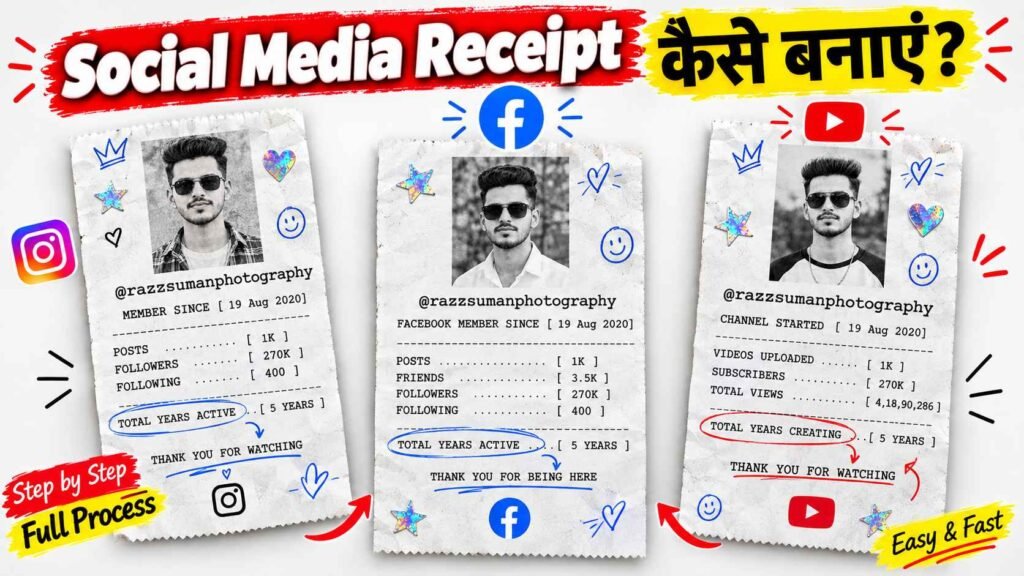
Social Media Receipt Prompts – These days, a new way of making photos is much discussed on Instagram, which is being known as IG Receipt. After getting this kind of filter in Instagram’s Reels Style tool, many people are creating their photos in a different style and sharing them on social media. After placing your photo in it, a receipt-like picture is created in which many information related to your profile is visible. Like what is your username, when did you start Instagram, how many followers you have, how many people you follow and how many posts you have made till now. All this information is shown on a white paper as if it were a receipt from a shop. Along with this, your photo, colorful stickers and beautiful writing are also visible. This is the reason why this picture looks very good and people are sharing it on their profiles and stories. But the problem is that apart from Instagram, many people want to create such pictures for Facebook and YouTube also. So today I have brought three different prompts for you, with the help of which you can create receipt-like images for Instagram, Facebook and YouTube in ChatGPT.
Social Media Profile Receipt Ai Photo Editing
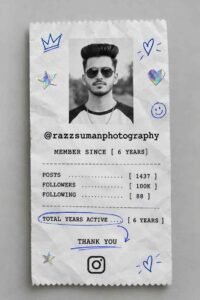
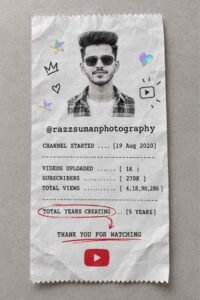
The three pictures you see in this article are made to show the information of a social media profile as a receipt. The first picture is from Instagram, the second is from YouTube and the third is from Facebook. The design of all three has been kept almost the same, but the information shown in them is different. In the first picture, there is a black and white photo of a boy in the middle of white paper. Below that, information about username, time of joining Instagram, total posts, followers, following and years spent on Instagram is given. The edges of the paper have color-changing stars, hearts and other small stickers. The second picture is of the YouTube channel, in which the name of the channel, date of launch of the channel, uploaded videos, subscribers and total views are shown. YouTube’s red colored play button has also been installed in it. The third picture is of Facebook, in which information like username, account creation time, posts, friends, followers and following are shown. The real paper-like texture, light folds, natural shadows and hand-made marks in these photographs make them special.
Rename Text In Social Media Receipt Ai Prompts
Before making these pictures, you will have to change some of the information written in the prompt as per your requirement. If you do not do this, someone else’s data or wrong information may appear in your created photo. For example, if you want to create an Instagram photo, first copy the Instagram prompt. Instead of the given username, write your Instagram username. After this, fill the information like year of starting the account, total posts, followers, following and years spent on Instagram as per your real account. Similarly, in the Facebook prompt, change your Facebook username, number of friends, followers and other available information. For YouTube, enter the channel name, channel start date, number of videos, subscribers and total views. If you don’t have accurate data for any information, leave it blank or fill in the actual information later in the space provided in the prompt. After this, also put your clear photograph and write clearly in the prompt that there should be no change in the face and identity. This will make the photo look like yours and it will be easy to keep the information given in it correct.
Instagram Prompt
YouTube Prompt
Facebook Prompt

PHOTO CREATE
Create Social Profile Media Receipt Ai Photo
If you also want to create a stunning picture like receipt for your Instagram, Facebook or YouTube profile, then you can use ChatGPT for this. To create such a picture you will need a good and clear photo of yourself along with the right prompt. In this article, I have given different prompts for all three social media platforms, with the help of which you can prepare the picture as per your choice. First of all, select the prompt of the platform of your choice and fill in your username, year of account creation, followers, posts, subscribers or other important information correctly. After this, upload your photo and send the prepared prompt to ChatGPT and ask him to create the photo in the same design. In no time, your photo can be ready in a receipt-like design, in which account related information will also be visible along with your photo. Keep in mind that ChatGPT may sometimes make incorrect words or numbers in the photo, so double check all information once the photo is ready. If you see any mistake, you can get it corrected and share the picture of your choice on social media.
Conclusion
Nowadays, many people like to share their photos in different styles on social media. This new style of IG Receipt is also becoming popular among people for this reason. If you want to create similar photos for Facebook and YouTube instead of creating photos just for Instagram, the Social Media Receipt Prompts in this article may help you. All you have to do is fill in your correct account information and use the prompt with your photo. Keep in mind that the photo creator may sometimes misrepresent names, numbers, or other writing, so double-check the finished photo before sharing it. If wrong information is visible at any place, get it corrected. We hope you enjoyed these three prompts and that they help you create a great receipt image for your social media accounts. Thank you so much for visiting our website. Be sure to keep visiting for more Trending AI Photo Prompts. If you like the article, do share it with your friends.

I’ve Been editing photos and videos for over 5 years. Here, I share Lightroom Presets, Ai Photo Editing Prompts, Vn Templates, and easy editing tutorials so you can give your photos and videos a professional look. Welcome to the world of creative, high-quality editing